Running a business from one screen
What it means to run a small business from a single console instead of ten tabs: what lives on the one screen, what waits for your yes, and why the site and the console mirror each other.
By Lance Culbreth, founder of Fraya · · 4 min read
Short answer
Running a business from one screen means the site, the shop, the customers, the money, the campaigns, the bookings, and the legal work sit in a single console with one conversation across all of it, instead of in ten tools with ten logins. The practical gain is not autonomy but fewer decisions: work arrives drafted, the numbers are already together, and nothing has to be copied from one tool into another.
The ten-tab problem
A one-person business typically runs on ten tools. The site is in one, the shop in another, email in a third, bookings in a fourth, the books in a fifth. Each has its own login, its own idea of who your customers are, and its own place where a task is waiting. The work of running the business becomes the work of checking the tools.
The cost is not only the subscriptions. It is the copying: the order that has to become a row in the ledger, the new customer who has to be added to the list, the post that has to be resized for each channel. None of that is the business. It is plumbing between tools that do not know about each other.
What lives on the one screen
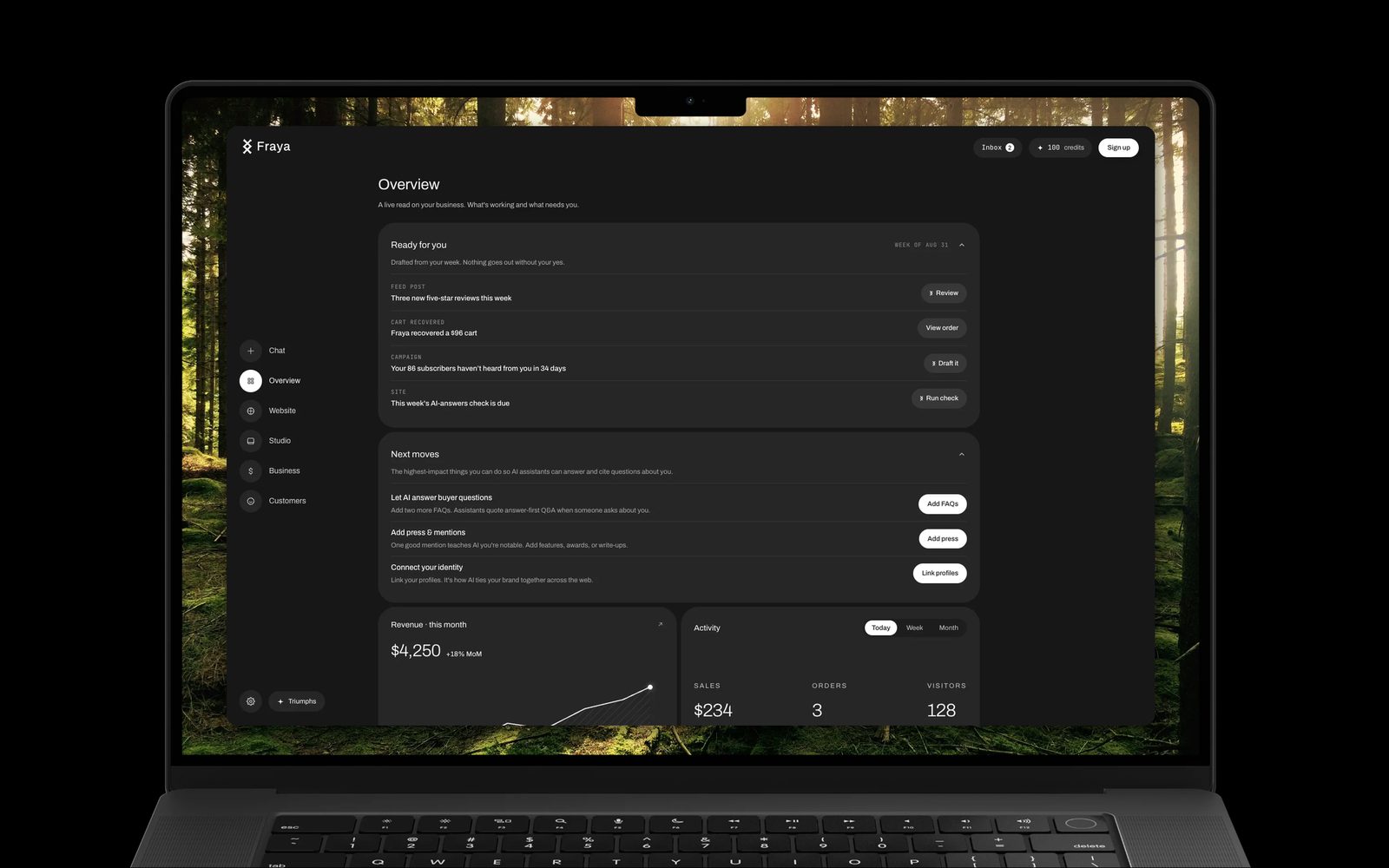
The Fraya console is a single page with views, the way a phone is a single screen with apps. Nothing reloads; you move between them and the state stays.
- Overview. What sold, who booked, what was said about you, and what is drafted and waiting. This is where a Monday starts.
- Website. The living surface itself, edited as a form so the design stays intact: sections, products, services, posts, events, the look, the domain, and the insights.
- Studio. Posts, campaigns, and imagery in your brand’s look, drafted from what happened this week.
- Customers. Everyone who bought, booked, subscribed, joined, or wrote in, with the full email history for each.
- Business. Orders, payouts, invoices, quotes, and expenses in one ledger, with the money in your own Stripe.
- Settings. Connections, billing, the legal playbook with its drafts and key dates, and notifications.
Every view can be linked to directly, so a task in the weekly note opens the exact screen it is about.
Drafted, then waiting for your yes
The one screen is not a dashboard of charts. It is a queue of finished work. A post about the piece that sold out, a campaign to the customers who bought last quarter, a reminder to the shopper who left a cart: each arrives written, with the reason it was drafted, and waits. You read, edit if you want, and approve. The only messages that go out on their own are receipts, booking confirmations, and cart reminders to shoppers who opted in.
This is the honest version of an AI coworker. She does not run your business. She removes the blank page and the copying, and leaves you the decisions.
Why the site and the console mirror each other
The living surface a visitor sees and the console the owner works in are two views of the same content. The rail in the editor lists the same sections the visitor scrolls. A product edited in the console is the product on the page and the product in the order and the product in the ledger. There is one record of it.
That is the technical advantage of one screen, and it is the same one the living surface has for visitors: one source, so nothing has to be reconciled. The site is fast because there is one document to render. The console is calm because there is one place to look. Both are true for the same reason.
What it costs, and what it replaces
Free to publish and sell, with 1% on sales. The operator, with the drafted work, unmetered conversation, and your own domain, is $29 a month. The stack it replaces is itemized in the guide on the real monthly cost of a small business stack, with each tool’s published price.
Straight answers.
Does one screen mean the AI runs the business for me?
No. Work arrives drafted and waits for your approval. Receipts, booking confirmations, and opted-in cart reminders are the only messages that send on their own. You make the decisions; she removes the blank page and the copying between tools.
Can I still use my own tools alongside it?
Yes. Payments are in your own Stripe account, customers and orders export as CSV, and the site lives on your own domain on the plan. The console is where the work is gathered, not a lock on it.
What happens on a Monday?
The console opens on what sold, who booked, what was said, and what is drafted for the week, with a short note in your email saying the same. Approving the drafts is usually the first ten minutes of the week.
Is the console the same on a phone?
Yes. It is one page with views, so it works on a phone the way it works on a laptop, and a link to a specific view opens that view.